When an AMOS upgrade is planned, most of the preparation goes into new functionality, parameters and workflows. The AIM interfaces that connect AMOS to other systems are often checked late in the project, or only after an interface fails in production. AMOS 26.6 retires 43 versions across 32 AIM services and deprecates a further 27 versions across 23 services. An interface that still uses a retired version will stop working after the upgrade.
This article explains the difference between retired and deprecated versions, lists the services most affected in 26.6, and shows which versions are available to move to.
Retired and Deprecated Versions in AIM
Each AIM service is published in numbered versions, and every interface is configured against one specific version. Changes to the life cycle therefore apply per version, not per service. TRANSFER WORKORDER remains available in 26.6, but versions 2.3, 2.4 and 2.5 do not.
Retired: the version has been removed from AMOS. An interface using it will fail after the upgrade.
Deprecated: the version still works but is no longer developed and will be removed in a later release.
Final: the version is stable and fully supported, and should be used for new or updated interfaces.
Which Interfaces Are Affected in AMOS 26.6
The changes concern several of the interfaces most commonly used by airlines and MROs, including TRANSFER WORKORDER, TRANSFER MRO WORKPACKAGE, TRANSFER MRO RESULT, TRANSFER ORDER, TRANSFER SHIPMENT, TRANSFER RECEIVING, TRANSFER BILLING, TRANSFER PUBLICATION, TRANSFER WORK TEMPLATE and EXPORT MEL BOOK.
In addition, seven complete services are marked as deprecated in 26.6. These include the four FLYdocs exports, TRANSFER AMOS ALLOWED CONFIGURATION and TRANSFER TASKCARD. Organisations still using them should plan a replacement.
Versions Available to Move To
For every version retired or deprecated in 26.6, a newer version of the same service was already available in AMOS 25.12. Interfaces can therefore be moved and tested on the current release, before the upgrade takes place.
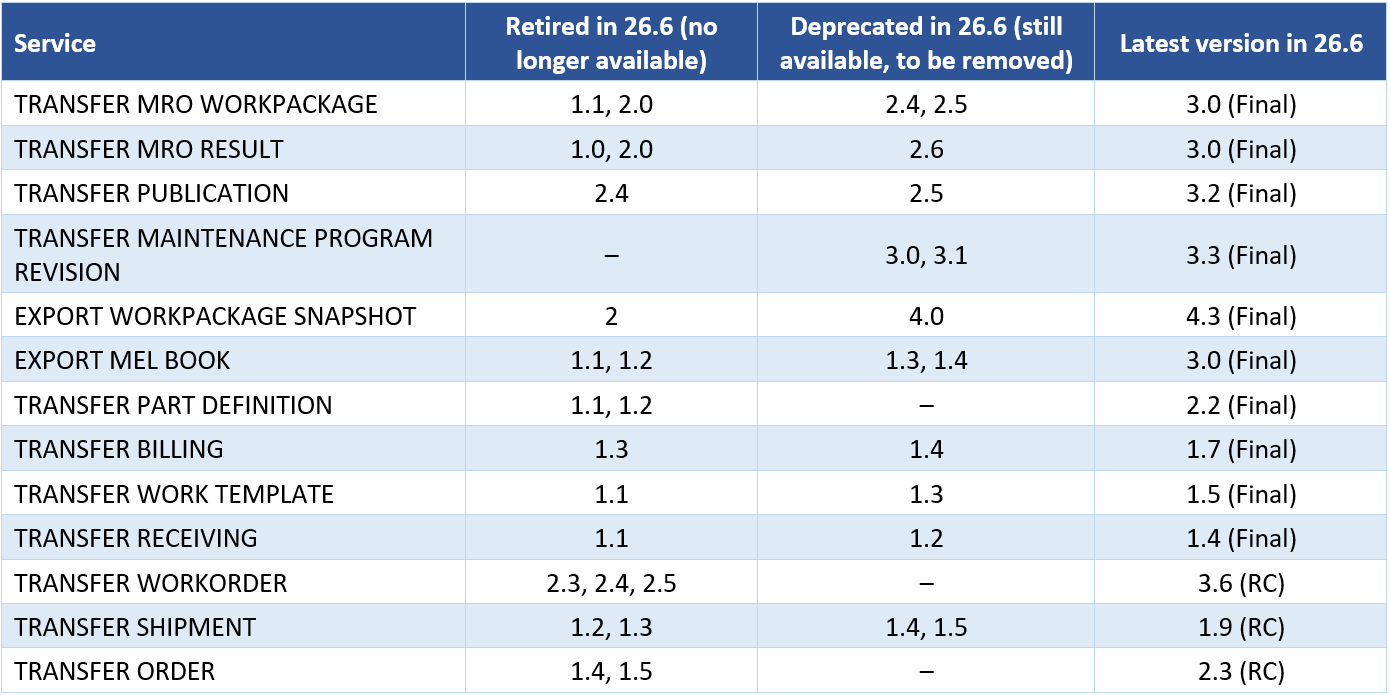
RC = Release Candidate. The last column shows the newest version of each service in AMOS 26.6.
Five of these services reached Final status in 26.6. For TRANSFER WORKORDER, TRANSFER SHIPMENT and TRANSFER ORDER the newest version is still a Release Candidate, so an earlier Final version, such as TRANSFER ORDER 2.2, may be the better choice. This should be confirmed with Swiss-AS before development starts.
How to Prepare
Inventory: list all services configured in AIM Webservice Configuration, the version each one uses, and the system or partner on the other side.
Compare: check each version against the target release and mark it as retired or deprecated.
Select target versions: choose the latest Final version available and agree the timeline with each interface partner.
Update and test: adjust the message mapping where the structure has changed and test the interface end to end in a non-production environment.
Go live: prepare a fallback per interface and monitor AIM logging after the upgrade.
Best Practices
Move interfaces before the upgrade, so the upgrade itself does not include interface changes.
Use Final versions where possible and treat Release Candidates with care.
Involve external partners early, as their development cycles are often the longest part of the plan.
Review the new services in 26.6, such as EXPORT MAINTENANCE EVENT, IMPORT ICRON RESULTS and the new warehouse imports, which may replace existing custom solutions.
Subscribe to the newsletter
Practical guidance on aviation data management, delivered straight to your inbox.
Conclusion
The retirements in AMOS 26.6 affect interfaces that many operators rely on every day. Because the replacement versions are already available, the work can be planned and completed well ahead of the upgrade. A structured review of all AIM configurations is the most reliable way to avoid interface failures at go-live.
Planning an upgrade to AMOS 26.6 or reviewing your AIM interfaces? Contact the EXSYN AMOS team at [contact link] to discuss an interface readiness check.