When an “Edit” Licence Changes the Approval Chain in AMOS
Some licences under APN 2110: Approval Control Board begin with “Edit…” and provide broader authority than their names may initially suggest. For AMOS operators, this makes it important to review how these licences are assigned through APN 15: Admin Roles and APN 16: Admin Programs, particularly where they provide access to Administrative Override within an approval process.
Licence 2179: Edit Issue-Order Requests is a useful example. The licence does more than allow a user to modify order approvals: it can also allow the user to act outside the approval configuration maintained in APN 2111: Approval Control Configuration.
This means a user may be able to approve an Issue-Order Request even when they are not configured as the approver for that request. Elevated “Edit…” licences should therefore be assigned according to the actual authority the user requires, not simply according to the word “Edit” in the licence description.
For organisations using AMOS as their maintenance and engineering system, access configuration is part of the wider control environment around engineering and maintenance processes.
Start with the APN 2110 Licence List
The Approval Control Board covers requests from several areas of the operation. Its licence list includes - Edit Scrap Part Requests, Edit Qualification Requests, Edit Maintenance Program Revision Requests, Edit Workorder Requests and many others.
At first glance, these licences appear to provide editing rights for a particular request type. Their actual capability may also include control over how the request is approved.
Each “Edit…” licence should be reviewed according to the authority it provides, the users who hold it, and the operational reason for the assignment.
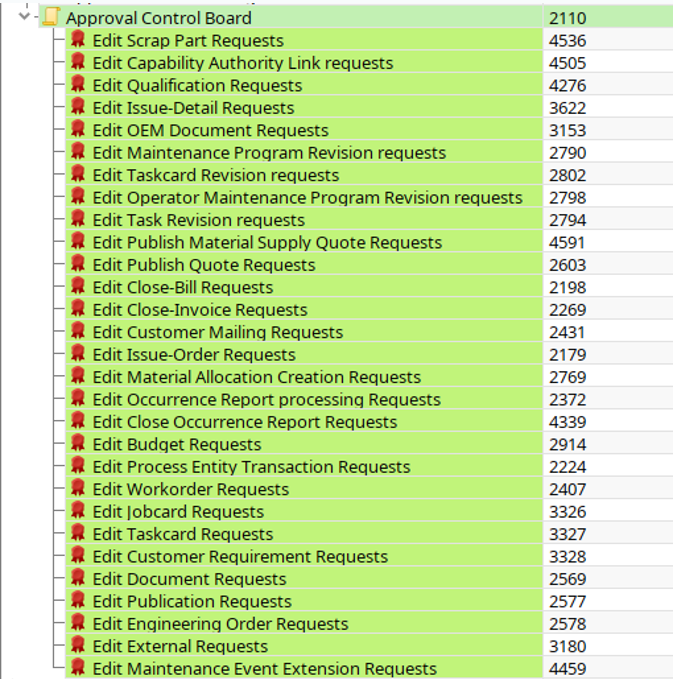
Snapshot 1: The APN 2110 licence list includes Licence 2179, Edit Issue-Order Requests, alongside several other approval-related “Edit…” licences.
Licence 2179 and Administrative Override
Licence 2179, Edit Issue-Order Requests, provides a clear example.
A user with this licence can modify all order approvals. The licence can also provide access to Administrative Override in the Approval Answer dialog. This allows the user to approve an “Issue-Order Request” outside the approver configuration maintained in APN 2111.
The user can therefore complete the approval without being set as the approver for that request.
This capability can support defined administrative or exceptional situations where an authorised user needs to intervene in the approval process. Its assignment gives the user a wider level of authority and should match their actual responsibilities.
Standard Approver Access in AMOS
A user completing approvals as part of the normal approval flow needs:
Write access to APN 2110: Approval Control Board.
A Yes licence for “View Issue-Order Requests”.
Assignment as the approver for the relevant “Issue-Order Request”.
With this setup, the user can approve or reject requests assigned to them through the APN 2111 configuration.
Licence 2179 adds administrative authority over the order-approval process. Users who hold it can act outside that configured approval route.
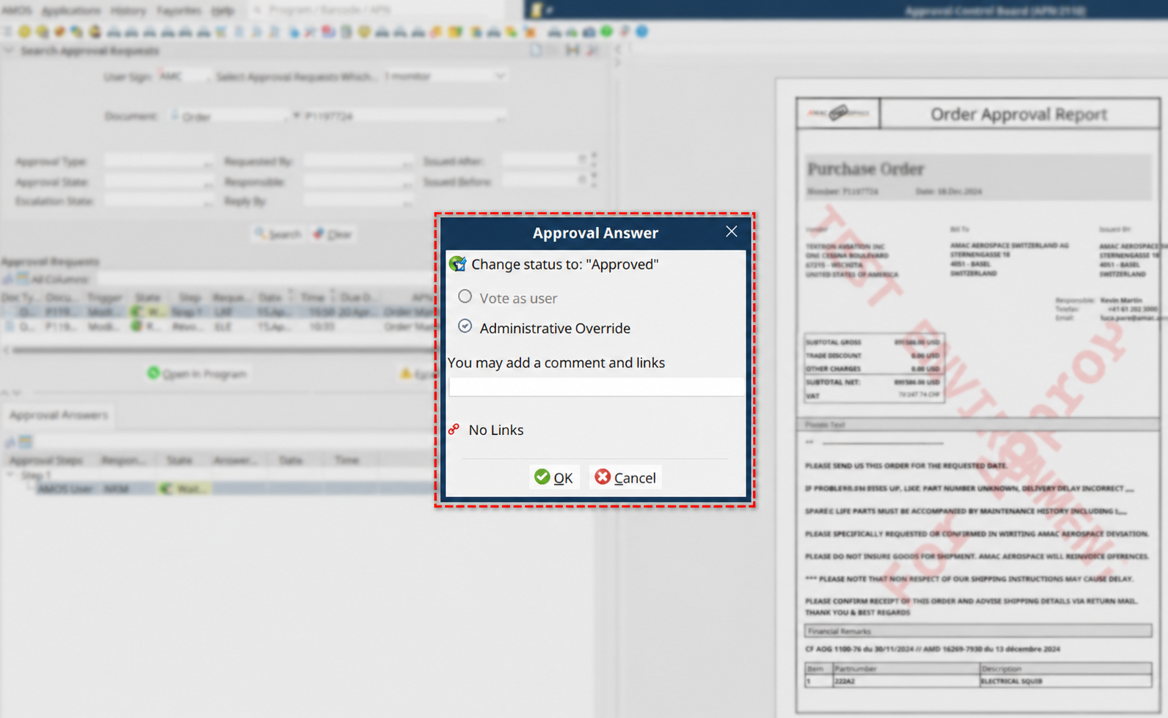
Snapshot 2: Administrative Override in the Approval Answer dialog allows an authorised user to act outside the configured approval chain.
Subscribe to the newsletter
Practical guidance on aviation data management, delivered straight to your inbox.
Reviewing Who Holds Administrative Authority
The review should begin with every user who holds an APN 2110 licence beginning with “Edit…”. For each assignment, the operator should confirm the request type covered by the licence, the capability it provides and the reason the user needs it.
The result can then be compared with the approval configuration in APN 2111. This shows who works through the standard approval route and who holds authority to intervene outside it.
Users responsible for approving or rejecting their assigned requests can remain within the standard approver setup. Elevated “Edit…” licences should be reserved for roles with a documented administrative or exceptional need.
Changes in responsibilities should also trigger a new review. A licence granted for a previous role can remain active long after the operational need has ended.
Keeping AMOS Approval Configuration and Licence Assignment Aligned
APN 2111 records the configured approval chain. The “Edit…” licences under APN 2110 determine which users may hold wider authority over that process.
Reviewing both gives the operator a clear record of who can approve each request, who can use administrative override and why that access has been granted.
Approval access remains controlled when every elevated capability has a clear operational reason, a responsible owner, and a regular review.
As with AMOS interfaces and other administrative configurations, access and workflow settings should be reviewed in the context of the operational process they support.
Frequently Asked Questions About AMOS Approval Control
-
APN 2110 is the Approval Control Board used to manage approval requests across different operational areas in AMOS. Access to individual request types depends on the licences assigned to the user.
-
Licence 2179, Edit Issue-Order Requests, allows a user to modify order approvals and can provide access to Administrative Override, allowing the user to act outside the standard approver configuration maintained in APN 2111.
-
Administrative Override allows an authorised user to complete an approval outside the normal approval route configured for the request. Because this represents elevated authority, access should correspond to a documented operational or administrative need.
-
For the Issue-Order Request example described here, a standard approver needs write access to APN 2110, a Yes licence for View Issue-Order Requests, and assignment as the approver for the relevant request through APN 2111.