Creating AMOS Work Template Revisions in Bulk: From Manual Workaround to Controlled Process
Work templates drive maintenance execution in AMOS. When an OEM revises an AMM task, a customer changes a requirement or engineering refines a procedure, the work template has to follow. It should follow as a new revision of the existing template, not as a new template.
For a single template, the AMOS GUI handles this well. For hundreds of templates during a migration, a fleet phase-in or an MPD revision campaign, it becomes a real challenge. AMOS transfer files cannot directly create a new revision of an existing active work template.
This article explains why, describes the loading strategy that works, and introduces the EXSYN platform application that turns it into a controlled, repeatable process.
Why bulk revisions are hard in AMOS
AMOS handles a single revision well through the GUI. Bulk loading is different: a standard transfer file load creates new templates, not new revisions of existing ones. Attaching each revision to the right original template takes a specific loading strategy with several dependent steps.
When it is done by hand for hundreds of templates, that strategy is slow and unforgiving. The typical risks are:
Revisions created as separate templates instead of linked to the original
Mismatched template types, leaving templates that AMOS cannot open
Content attached to the wrong template where titles are duplicated
Work step text losing its formatting in transfer
Open work orders still running against the previous revision
Subscribe to the newsletter
Practical guidance on aviation data management, delivered straight to your inbox.
The Work Template Revision application
The Work Template Revision application on the EXSYN platform builds this loading strategy into a guided workflow. It extracts your existing AMOS work templates into a single Excel template. You edit all revisions in that one file, and the application produces everything needed to load them in bulk.
The application covers six AMOS work template processes:
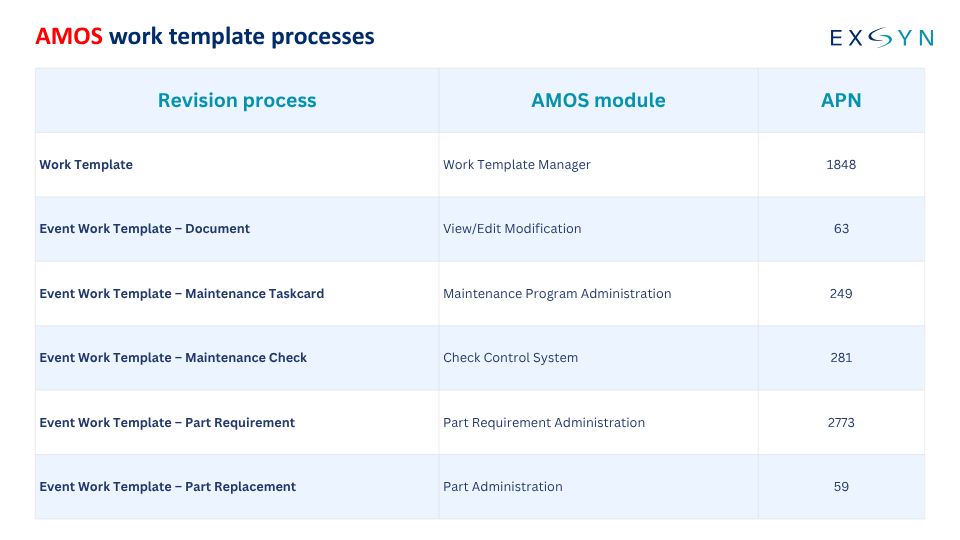
Each process includes both the event work templates and the individualised effectivity work templates.
How it works
The application guides users through five stages on the EXSYN platform:
Extract. Work Template Revision Application pulls the existing work templates from your chosen AMOS environment into one Excel template.
Edit. Your engineers update the revisions in Excel, adding steps and content where needed.
Validate. After upload, the application checks the data and returns exception reports to resolve until the data is clean.
Load. The application generates the files needed to load the new revisions into AMOS.
Review and link. Once reviewed in AMOS, the new templates are linked as revisions of their originals.
All outputs stay available under Files on the platform.
Best practices
Test first. Run the full workflow in a test environment before production.
Review before linking. The final linking step cannot be undone, so validate the new templates first.
Keep the Excel template structure. Add content freely, but don't change the layout.
Follow the Help documentation step by step. The order of the steps matters.
Check open work orders so they pick up the new revision.
Conclusion
Bulk work template revisions in AMOS are achievable, but not with a straightforward transfer file load. Done by hand at scale, the process is slow and error-prone.
The Work Template Revision application wraps a proven loading strategy in a guided workflow with extraction, validation and generated load files. Your engineers edit content in one Excel file instead of managing hundreds of individual loads.
Planning an MPD revision, fleet phase-in or template clean-up? Contact the support team at support@exsyn.com to discuss your approach.